
Make an option the player can pick only once
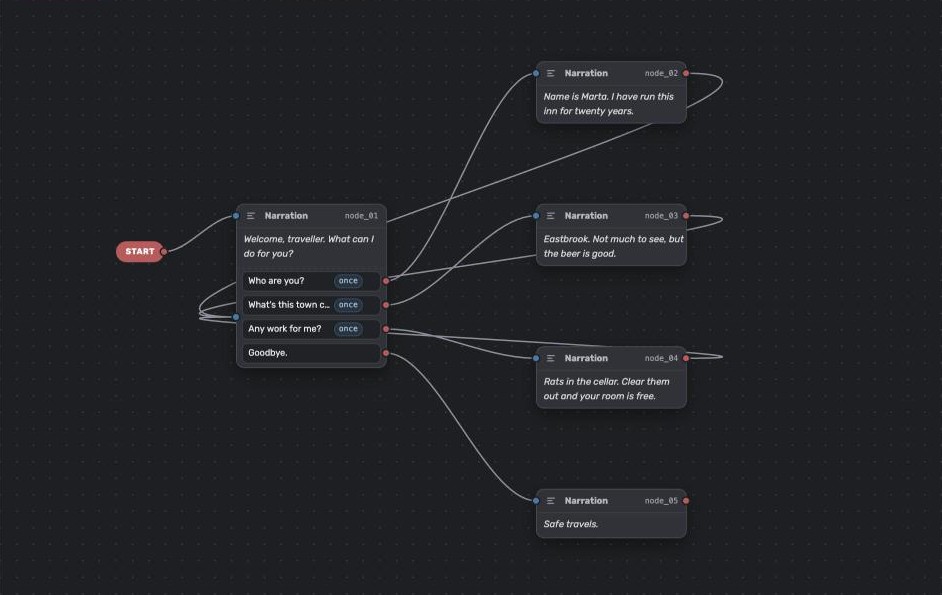
The case: the player talks to an innkeeper and can ask several questions: Who are you?, What's this town called?, Any work for me?. After each answer the player is back at the list of questions, but a question they have already asked shouldn't be offered again. Goodbye is always there, so the player can leave.
The short answer: select the node with the options and turn on Ask once on each question. Then link each answer back to the node's options with Return to options.
Before you start
You need a dialogue with a node that has options, and a node for each answer. If you are starting from scratch:
- Open your dialogue in the Dialogue Builder.
- Write the innkeeper's greeting in a node, for example "Welcome, traveller. What can I do for you?"
- Add the questions as options: click + Option on the node, or select the node and click Add option in the inspector.
- Add a node for each answer, and drag from each option's dot to its answer node.
1. Turn on Ask once
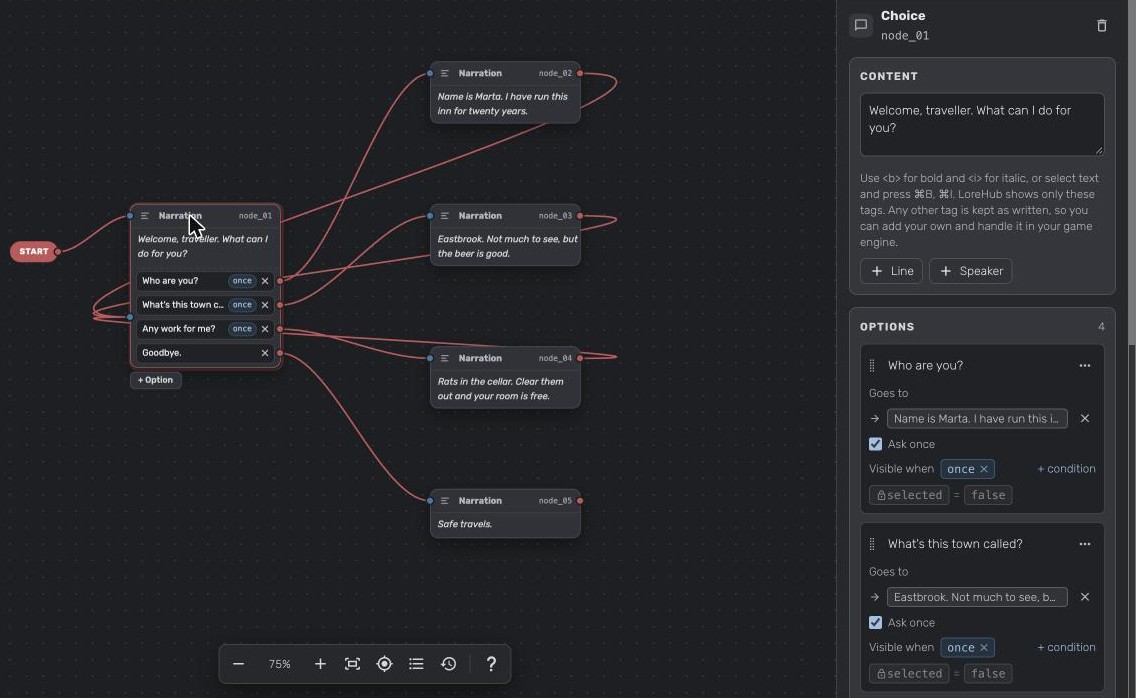
- Click the node with the options to open it in the inspector.
- Under Options, find the question and turn on Ask once below it.
- Do the same for every question that should be asked only once. Leave Ask once off on Goodbye.
The option's Visible when now shows a once chip, and the option gets a once pill on the canvas, so you can see at a glance which options disappear.
2. Bring the player back to the questions
An option that is asked once only makes sense if the player comes back to the list. After each answer, link back to the node with the questions:
- Drag from the answer node's dot to the innkeeper's node.
- Select the answer node. Under Links, turn on Return to options for the new link.
With Return to options, the player skips the innkeeper's greeting and sees the questions again, minus the ones already asked. Without it, the greeting would play again first.
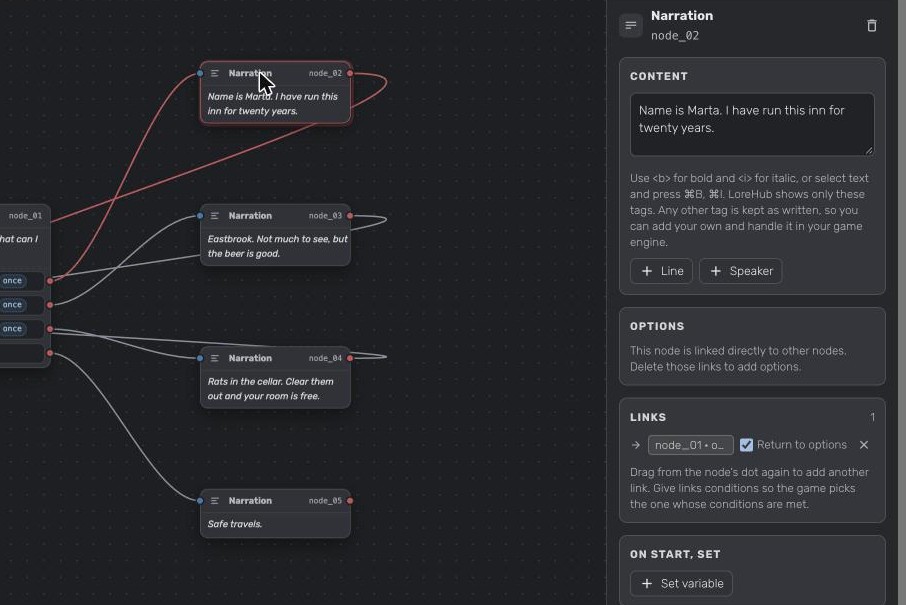
Return to options shows only when the link goes to a node that has options. You'll also find it in the inspector when you select the link itself, and on an option's link under Goes to, if an option leads straight back.
3. Leave a way out
Keep at least one option without Ask once that leads on, like Goodbye. If every option is asked once and every one leads back, the player ends up with nothing to pick. The inspector warns you about this on the node:
Every option is asked once and leads back here, so the player runs out of options. Add an option that leads on, or turn off Ask once on one of them.
4. Test it
- Click Show player and play the dialogue.
- Pick Who are you?. After the answer you are back at the questions.
- Who are you? is now faded, with its condition next to it. Hover it to see Hidden in the game: its condition is not met. In your game the player won't see it at all.
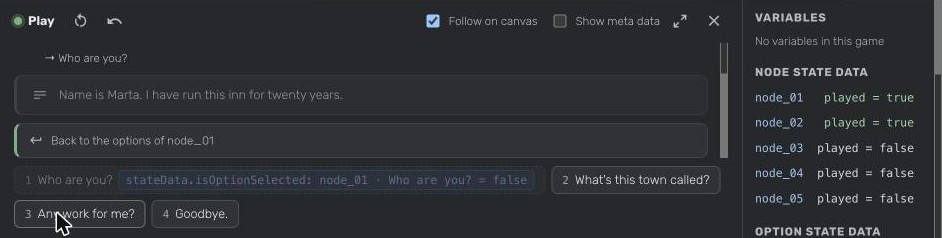
The test player still lets you click a faded option, so you can check the rest of the dialogue without starting over. Click Restart to play from the beginning with every question available again.
Turn it off
Turn off Ask once on the option, or click the cross on its once chip.
Variations
Unlock a question after another one. Say Any work for me? should appear only after the player asked Who are you?. On Any work for me?, click + condition, pick stateData.isOptionSelected under Predefined variables, then pick Who are you?. The condition starts as true: the option shows once Who are you? was picked. Click the value to switch it to false for the opposite.
React to a line the player has already heard. stateData.isNodePlayed works the same way for nodes: it checks whether the player has already seen a node. Use it on an option, or on a link, to play a different line the second time round.
Remember it in other dialogues. Ask once remembers what was picked in this dialogue. If another dialogue needs to know that the player asked the question, use a variable instead: set it on the answer node with Set variable, and check it with + condition wherever you need it.
In your game
If you load LoreHub dialogues into your own engine, Ask once is exported as a condition on the option: the option's own stateData.selected must be false. Your game marks an option selected when the player picks it, and checks the conditions again each time it shows the options. The LoreHub Dialogue Player for Godot does this for you. For the JSON, see state data conditions and StateData.
Did this answer your question?
More in Dialogue Builder
Still need help?
Can't find what you're looking for? Ask us, we read every question.