Variable pickers that know where you are
Most dialogue tools give you one long global list of variables. You get folders or a search box, but when you add a condition you still hunt through every variable in the game, and nothing tells you where a variable is actually set or checked. In LoreHub, every variable picker now puts the variables you are working with first and shows where each one is used.
What's new
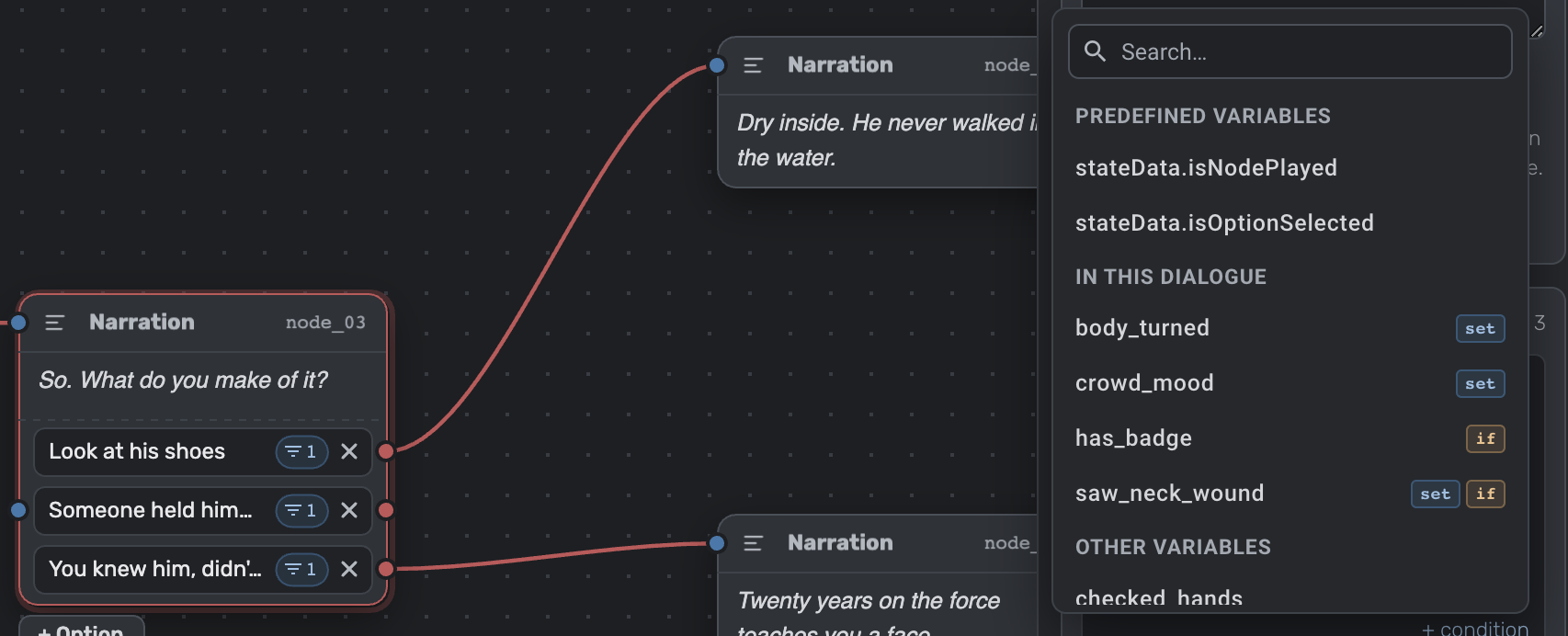
- In this dialogue, first. When you add an On start set, an option or link condition, or a required variable, the picker opens with In this dialogue: the variables this dialogue already sets or checks. Everything else follows under Other variables, so nothing is out of reach.
- Scopes see their children. In the Route Planner, the Requires and Produces pickers of a contract open with the scope's name, like In Chapter 3: the variables used by that scope and all its child scopes. A chapter's contract sees its scenes, while a scene's contract stays short.
- Usage at a glance. Rows in the first group carry small tags:
setwhen something here sets the variable,ifwhen a condition here checks it, andreqwhen a contract requires it. - Hover to see where. Hover a variable to see its comment and every place it's used, down to the node or option. In a contract, uses in child scopes show their path, like Docks > Meet the widow.
- Search works as before, and keeps the same order, so a match in this dialogue still comes first.
Why it matters
The variable you set three nodes ago no longer hides among variables from other chapters. You can tell whether a condition can ever be true without opening other nodes, you're less likely to create a duplicate because you couldn't find the original, and your contracts stay in step with the dialogues they describe.
Tools that keep stories in text files can't easily tell you where a variable is used without compiling the whole project. LoreHub stores your dialogues as structured data, so it knows exactly where every variable is set, checked and required, and shows it right where you pick.
Try it
Open any dialogue in LoreHub, select a node and add a condition or an On start set. If something feels off, tell us on Discord or Reddit.