LoreHub MCP: your LoreHub world, ready for any AI agent
Your world already holds what an AI agent needs to be useful: the stories, the dialogues, who says what, the characters and places, the lore behind them. The LoreHub MCP server hands all of it to Claude, Cursor or any other app that speaks the Model Context Protocol, so you can work with your world right in your chat or editor. Your API key sets the access. Read key: agents look. Write key: agents create and edit, never delete. Every change shows in your history. Writing is coming in the next release; today's tools all read.
What it does for each role
- Writers.
get_dialoguereads a dialogue as a script: every node in reading order with its speaker, lines, options and conditions.search_worldfinds each line, option, dialogue or document where a name or phrase comes up. - Lore keepers.
get_documenthands the agent a character, place or lore entry with its description, tags, relations and the dialogues that mention it, so it can check a new line against what your world says. - Narrative designers.
list_dialoguesfinds a story's dialogues by name, andcheck_dialoguereports nodes nobody can reach, options without a target, dead ends, variables that are set but never checked, and a summary of the story's route map checks. - Directors and artists. Director's notes → reference briefs and shot lists.
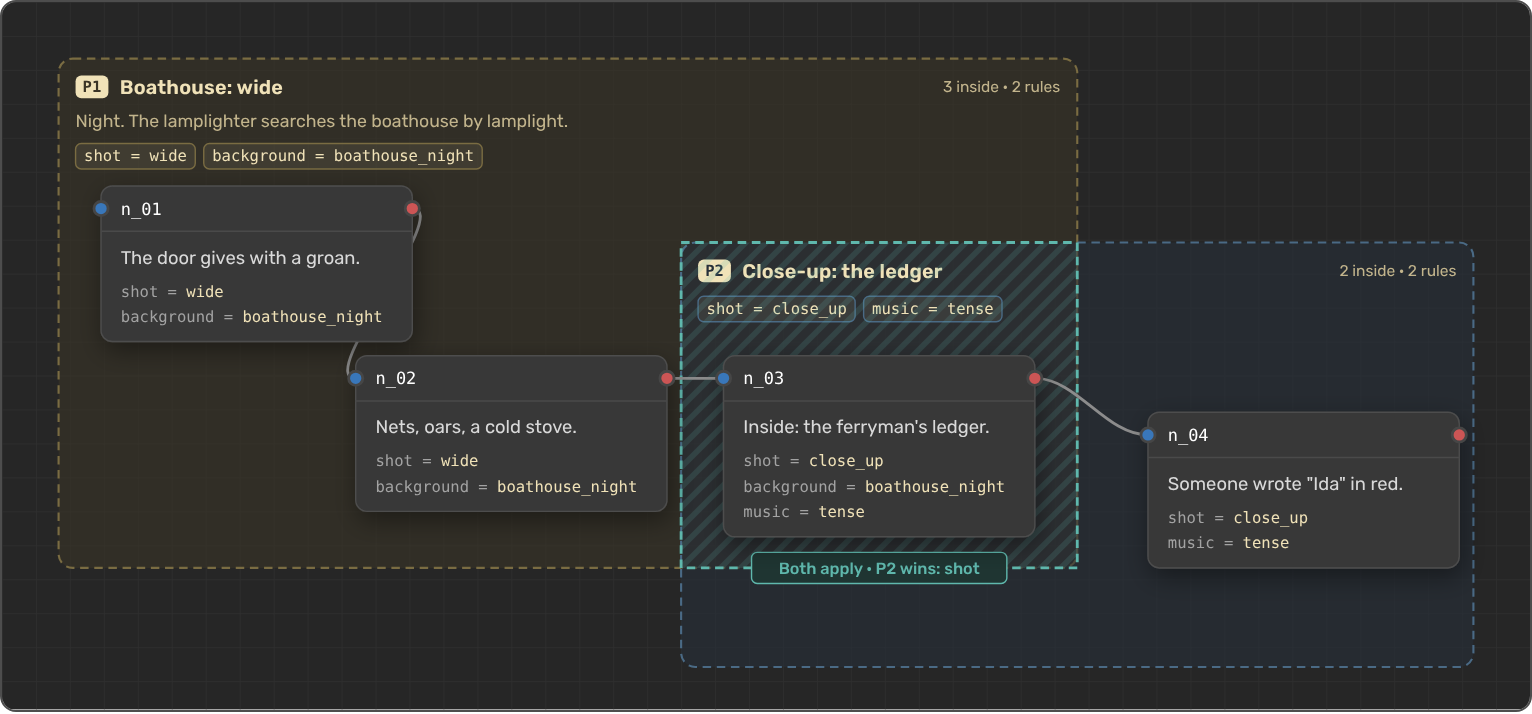
get_dialogue_metareads the Meta Areas drawn on the Dialogue Builder canvas: each area's title, note, priority and rules, likeshot = close_up, and the nodes inside with their speaker and lines. Where two areas overlap, the higher priority wins. Thereference_briefandshot_listprompts turn them into a brief per area or a numbered shot list. - Voice-over and producers.
get_character_lineslists every line of a story by speaker, with line and word counts and the line before each one, and thevoice_casting_sheetprompt makes one entry per speaking character with voice direction and sample lines.
Don't know the ids? Ask for "the dialogue Tom at Grandpa's" and the agent finds your world, story and dialogue itself with list_worlds, list_dialogues or search_world. Today's eight tools all read, so a Read key is all they need, and Viewer access in the world is enough.
How to use it
You need uv and a LoreHub API key. In LoreHub, open the avatar menu → Profile → API keys, pick the world, choose Read or Write, choose when the key expires and select Create key. Read is all today's tools need, so we recommend it for now. Copy the key, which starts with lh_: LoreHub shows it only once. In Claude Code, run:
claude mcp add lorehub --env LOREHUB_API_KEY=lh_your-key \
  -- uvx lorehub-mcp
For Claude Desktop, Cursor and other apps, the LoreHub MCP page has the config to paste. Then ask your agent something like "Read the dialogue Tom at Grandpa's and check it for dead ends", "What does our world say about the Ferryman?" or "Make a voice casting sheet for the first story".
Each world gets a number of API calls a day from its plan (10 on Free), shared by all its members' keys. Most tools cost 1 call, check_dialogue costs 2 and get_dialogue_meta 2 or 3, and every result tells the agent how many calls are left. Each key works in one world and expires when you choose. A Write key, once editing ships, lets agents create and edit but never delete, and every change shows in your history. If a key leaks or you stop using it, revoke it on the same page and it stops working at once.
The package is lorehub-mcp on PyPI. Directing with Meta Areas? Start with the Meta Areas guide.
Try it
Connect your agent to LoreHub and ask it about your world. If something feels off, tell us on Discord or Reddit.