
All news
Feature
Play your dialogue without leaving the canvas
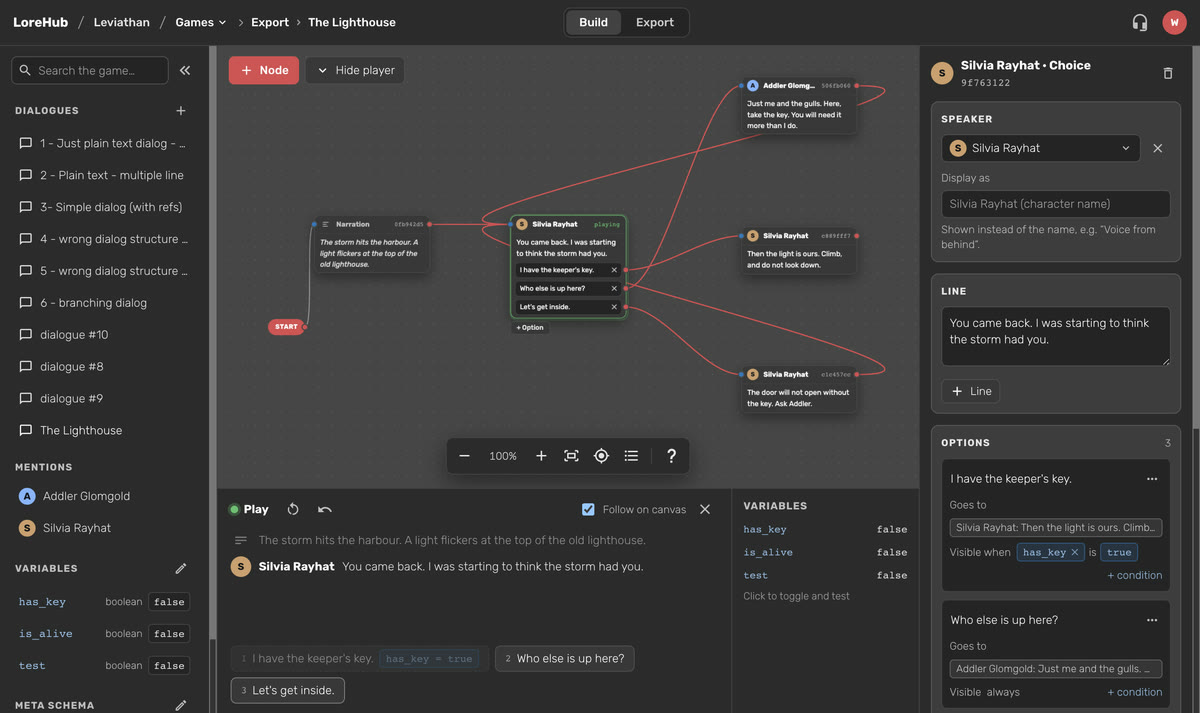
Testing a branch used to mean leaving the Dialogue Builder for a separate player page, then finding your place on the canvas again. Now the player opens right under the canvas, so you can play a dialogue and see where you are in it at the same time.
In this short scene, "I have the keeper's key." only shows up in the game once has_key is true. The player shows it dashed with its condition, you ask Addler who else is up there, he hands you the key, and the option unlocks on your way back to Silvia.
What's new
- Show player. Click Show player next to + Node and a drawer slides up under the canvas. Click Hide player, or the close button in the drawer, to put it away. The top bar now has just Build and Export.
- The current node lights up. The node being played gets a green border, and its id changes to "playing", so you always know which card you're on.
- Follow on canvas. With Follow on canvas ticked, the canvas glides to each new node and the inspector opens it, so you can fix a typo the moment you spot it. Untick it to look around while you play.
- Edits show up while you play. The player reads the dialogue you're editing, so a changed line or a new link is there on the next step. No export, no reload.
- See every choice. Each option is a numbered button. An option whose condition isn't met is still there, drawn dashed with the condition next to it, so you can test that branch too. The player in your game shows only the options whose conditions are met.
- Test with variables. The Variables column shows each variable's current value. Click one to flip it and see how the branches change. This only changes the test run, not your dialogue.
- Step back and restart. Go back one node, start again from the beginning, or select a node on the canvas and play from there.
Try it
Open any dialogue in LoreHub and click Show player. If something feels off, tell us on Discord or Reddit.